Monthly Archives: July 2009

Virgin Media to lower price of their 50Mb Broadband

According to their Press Office Virgin Media will lower the price of their flagship 50Mb Broadband service to £28 a month when taken with a phone line or £38 as a standalone product.

Also Virgin are trailing 10Mb upload speeds on the the 50Mb service in the Midlands and the North East of England. Lastly they said the Traffic Management will not be applied to the service for the time being. Let’s hope it says that way and I look forward to the price reduction and the eventual upload speed increase.

Installing an “E edition” of Windows 7

As Windows 7 for the European Union Economic Zone, Croatia and Switzerland will not include Internet Explorer or related technologies users will need to manually install a web browser of their own choice like Internet Explorer, Apple Safari or Mozilla Firefox or something else.

Below is the required steps from the Windows Help site detailing how to reinstall your PC with Windows 7. If your not confident with doing this on your own then seek the services of an IT Technician or a computer shop to do this for you.

Step One: Back up your files and personal data
As you need to perform a custom (clean) install, you need to generate backup copies of all personal data including documents, pictures, music and videos, this is independent of whether Windows Vista, Windows XP, or another operating system is installed on your PC. You can save your files to a USB, external hard drive or to an online storage device such as Windows Live SkyDrive.

With Windows Easy Transfer you can simply transfer user accounts and data from one Windows operating system to another. In addition you can read Windows help instructions, and watch a video on Windows Easy Transfer. You can also learn how you can restore certain files in this article. Click here for more information.

Step Two: Save your preferred browser
Go to your preferred browser of choice and instead of running the application, save it to your preferred storage device whether that is a DVD, USB or an external storage device, have that handy for when you install Windows 7 as this will be needed for you to be able to get onto the internet.

Step Three: Install Windows 7
Next, install Windows 7 by following the included instructions.

Step Four: Re-install your browser
Re-install your browser from your DVD, USB, or other external storage device.

Step Five: Re-install all your personal data
Re-install all your personal data including your files and media that you want to use on your PC.

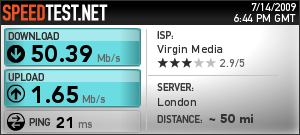
Upgraded to 50Mbps Broadband

This afternoon Virgin Media came round to “install” their 50Mbps Broadband service. This means that this website will now load a bit faster due to a 1.65Mbps upload speed rather than the meagre 768kbps upload that I had before.

Also the new service uses a new DOCSIS 3.0 network compared to the legacy DOCSIS 1.1 network. Below is the result of the speed test on the new line.

517341184

Microsoft update on the Widnows 7 RTM

Microsoft blogger Brandon LeBlanc has published an update on the Windows 7 RTM and this is a quote from the Windows Team Blog.

Over the past week, there have been many rumours surrounding RTM.

We are close, but have not yet signed off on Windows 7. When we RTM you will most certainly hear it here. As we’ve said all along, we will RTM Windows 7 when it’s ready. As previously stated, we expect Windows 7 to RTM in the 2nd half of July.

Brandon has also shared the step-by-step validation process for the RTM to ensure a quality is as good as it can be.

Another thing to keep in mind is that when we do a specific build internally of Windows 7 we have an extensive step-by-step validation process to ensure quality. This process takes time. Just because a single build may have “leaked” it does not signal the completion of a milestone such as RTM. As always, don’t believe everything that you read on the Internet – except this post ;-).

The timeframe has not changed and below is the timeline according to the blog.

  • MSDN & TechNet Subscribers: Subscribers will be able to download the final version of Windows 7 a few weeks after we announce RTM.
  • Volume License (VL) Customers: Windows 7 will be available to Volume License customers on September 1st.
  • Consumers, Enthusiasts, & Beta Testers (Everyone else): The retail version of Windows 7 will be available in stores October 22nd. If you pre-ordered Windows 7, it should be delivered sometime around the October 22nd timeframe (depends on the retailer).
  • On New PCs: OEMs are expected to start shipping new PCs with Windows 7 pre-installed on them around October 22nd.

Office 2010 The Movie

According to Neowin.net the Office 2010 Beta will be released to a private beta group along with an announcement of the “Release to Manufacturing” of Windows 7. It’s believed the Beta won’t be too different from the leaked “Technical Preview”.

Microsoft also released a teaser on their “Office 2010 The Movie” website. I personally like the Hollywood style that’s being used for this teaser.

Below is the a teaser from their website.

Windows 7 Family Pack Licence ?

My friend Kristen Kenny has uncovered an interesting licensing clause for Windows 7 Home Premium known as a “Family Pack” licence. This licence allows a single copy of Windows 7 Home Premium on up to 3 computers in a single household.

Below is a quote from the licence terms from the latest build of Windows 7 Home Premium.

2. INSTALLATION AND USE RIGHTS.
a. One Copy per Computer. Except as allowed in Section 2 (b) below, you may install one copy of the software on one computer. That computer is the “licensed computer.”

b. Family Pack. If you are a “Qualified Family Pack User”, you may install one copy of the software marked as “Family Pack” on three computers in your household for use by people who reside there. Those computers are the “licensed computers” and are subject to these license terms. If you do not know whether you are a Qualified Family Pack User, visit go.microsoft.com/fwlink/?Linkid=141399 or contact the Microsoft affiliate serving your country.

c. Licensed Computer. You may use the software on up to two processors on the licensed computer at one time. Unless otherwise provided in these license terms, you may not use the software on any other computer.

d. Number of Users. Unless otherwise provided in these license terms, only one user may use the software at a time.

e. Alternative Versions. The software may include more than one version, such as 32-bit and 64-bit. You may install and use only one version at one time.

I personally find this potentially useful and hope the idea does bare fruit to allow me to cheaply upgrade my family to Windows 7 Home Premium at Christmas 🙂